AcronisAcronise True Image
Acronis® True Image™ Home 2011
Acronis True Image Home 2011 assures that all your important data, including photos, videos, music, documents and applications, are fully protected and can be recovered quickly in the event of any disaster.
- September 2010 Top 25 Most Popular
- Software of the Year 2010
- Acronis wins PC Advisor's Best PC Utility award
- The new king of midrange backup applications is Acronis Backup & Recovery 10’ according to Storage Magazine and SearchStorage.com’s quality awards for backup and recovery software’
- Acronis True Image Home 2011
- Disk Imaging Software Review
- The Backup Solution for Everyone
- Have you ever accidentally deleted a file, had a virus corrupt your files, or had a disk fail? These are just a few examples of how people lose pictures, music, personal and financial data every day. Don’t let this happen to you. Protect your PC with Acronis True Image Home 2011, featuring local and available online backup.
- PC Backup and Recovery of Systems, Applications and Files
- Acronis True Image Home 2011 assures that all your important data, including photos, videos, music, documents and applications, are fully protected and can be recovered quickly in the event of any disaster. Use our intuitive graphical user interface to easily define where you’ll be backing up your PC and how often. Create copies of your hard drive with just a few quick steps while continuing to work. If you lose an important file or need to recover an earlier version of it, don’t worry: you can go back in time to retrieve it in seconds.
Backup
- Disk imaging
- File backups
- Full, incremental and differential backups
- Around the clock protection
Manage & Protect
- One-click protection
- Set & Forget backups
- Try&Decide®
- Encryption
- Privacy tools
Recover
- Quick restore
- Recover files and folders
- Recover to any point in the past
- Keep working during a restore
- September 2010 Top 25 Most Popular
- Software of the Year 2010
- Acronis wins PC Advisor's Best PC Utility award
- The new king of midrange backup applications is Acronis Backup & Recovery 10’ according to Storage Magazine and SearchStorage.com’s quality awards for backup and recovery software’
- Acronis True Image Home 2011
- Disk Imaging Software Review
- Fast and Easy Backup and Recovery
- Acronis True Image Home 2011 provides complete system image backup and recovery of your home PC's operating system, applications, settings and personal files.
- New Windows® 7 Integration
- Acronis True Image Home 2011 scales to the needs of novices and advanced users alike. Optimizations for Windows 7 enable seamless integration into your Windows control panel so you can back up Windows libraries with little effort.
- Try&Decide®
- The Try&Decide feature allows you to create a secure, controlled temporary workspace on your computer without requiring you to install special virtualization software. You can perform various system operations without worrying that you might damage your operating system, programs or data. After making virtual changes, you may apply them to your original system. If you make changes that you want to keep, you might want to commit those changes to the system. Among the operations you may attempt with this feature is to open mail attachments from unknown senders or visit websites that might contain potentially troublesome content.
- Continuous Data Protection
- Acronis Nonstop Backup™ automatically creates incremental backups every five minutes, allowing users to roll back their system, files, and folders to any point in time.
- Predefined backup schemes
- Acronis True Image Home offers you predefined backup schemes designed for specific user needs - from a disk space-efficient scheme suitable for users with limited backup storage capabilities to a scheme for those users who need higher security for their data and system. The program offers different backup schemes for disk and file type backups. You just select a scheme and the program automatically manages your backups. In addition, you can create a custom backup scheme which will exactly suit your needs.
- USB 3.0 support
- Acronis True Image Home supports the new USB 3.0 standard. If your motherboard can work with USB 3.0 hard disk drives, you can use the high data transfer speed offered by the new standard to make your backups run much faster.
- New Graphical User Interface
- We've redesigned our award-winning, user-friendly interface with new features like Drag and Drop for faster navigation. Wizards and One-Click configuration tools select the best backup and restore options for your needs.
- Acronis Online Backup and Plus Pack add-ons
- Acronis True Image Home 2011 works great with Acronis Online Backup to copy the most important files on up to five home PCs or laptops to a secure online location, accessible from any PC with an Internet connection. And it's fully integrated with the powerful Acronis True Image Home Plus Pack option, which allows you to restore your PC to dissimilar hardware regardless of make, model, or installed components, or to a virtual machine.
- September 2010 Top 25 Most Popular
- Software of the Year 2010
- Acronis wins PC Advisor's Best PC Utility award
- The new king of midrange backup applications is Acronis Backup & Recovery 10’ according to Storage Magazine and SearchStorage.com’s quality awards for backup and recovery software’
- Acronis True Image Home 2011
- Disk Imaging Software Review
New and improved features
- Acronis® Nonstop Backup™
- This must have feature has been expanded to support Acronis Secure Zone®, enabling you to recover on the fly, wherever you are, to any point in time, from a secure partition on your hard drive, even if your operating system has failed. (Note: requires working hard disk drive).
- Graphical User Interface
- A redesign of our user-friendly interface includes new features like Drag and Drop for faster navigation, Wizards and One-Click configuration tools to select the best backup and restore options for your needs.
- Predefined backup schemes
- Acronis True Image Home offers you predefined backup schemes designed for specific user needs - from a disk space-efficient scheme suitable for users with limited backup storage capabilities to a scheme for those users who need higher security for their data and system. The program offers different backup schemes for disk and file type backups. You just select a scheme and the program automatically manages your backups. In addition, you can create a custom backup scheme which will exactly suit your needs.
- Full Windows 7 Integration
- Discover how well Acronis® True Image™ Home 2011 and Windows® 7 work together to best protect your PC. Enhancements include Acronis integration within the Backup and Restore section of the Windows 7 Control Panel; the ability to view and restore previous file or volume versions from the Context menu; backup and restore of Windows libraries; and the ability to launch Acronis® True Image™ Home 2011 backups.
- Time Explorer
- You'll find this only with Acronis: an easy way to view and manage your backup files from a single screen. Annotate backup comments and review screenshots that show the state of the desktop at the moment of the backup.
- USB 3.0 support
- Acronis True Image Home supports the new USB 3.0 standard. If your motherboard can work with USB 3.0 hard disk drives, you can use the high data transfer speed offered by the new standard to make your backups run much faster.
Core Features
- Disk Imaging
- Backup the entire system on the fly with our patented disk imaging technology. It ensures the recovery of your operating system and applications without reinstalling any software.
- File Backup
- Back up individual files, folders or file categories.
- Acronis Secure Zone®
- Secure partition that allows you to store a disk backup on your system drive. Recover on the fly, wherever you are, even if your operating system has failed.
- Set&Forget™
- Configure just once and Acronis software performs the backups automatically from that point on.
- Exclude files and folders
- Back up only the data you want in order to save disk space.
- Acronis® Startup Recovery Manager
- Boot and restore a system after a failure. Start the recovery process simply by selecting the F11 key, even if your operating system has failed.
- Reserve Backup Copy
- Store multiple copies of the backup in another pre-defined location in a pre-selected format.
- Virtual Hard Disk Support
- Convert Acronis' backup images (.tib) into virtual hard disk files(.vhd) and vice versa, providing compatibility for Microsoft Windows 7 backup.
- Privacy tools
- Thorough system cleaning and reliable data destruction of files, partitions, or volumes.
- Acronis Online Backup capability
- Optional Acronis online storage services are available to automatically backup valuable data or files over the internet to a secure location.
- Dynamic Disks and GPT Support
- Is available with Acronis True Image Home 2011 Plus Pack
- Incremental and differential backups
- Acronis® True Image™ Home 2011 gives you alternatives to performing full backups every time by offering incremental and differential backups. Both capture changes only and save disk space with Acronis® data compression.
- Try&Decide®
- Safe environment for risk-free testing of new software or visiting websites with potentially dangerous content.
- Clone Disk
- Copy your entire Hard Drive and replace it with a new one without reinstalling operating systems and applications, saving hours of effort.
- Smart Scheduling
- Run backups automatically at preset or elapsed time, when the user is idle, on user logon/logout, on system startup/shutdown, or in coordination with other events.
- One-Click Protection
- Create a backup strategy of the system and implement it with just one click.
- Boot from Windows 7 image
- Windows 7 Ultimate users can boot from a backup image (.tib file) containing a backup of their system partition. This will allow the ability to test a backed up system without actual restoration. If the operating system boots from the .tib file, then it will boot when the need arises for a system recovery.
- Live Backups
- Keep working right through your backup for maximum convenience.
- Image Encryption with Advanced Encryption Standard (AES)
- Protect your backup data by encrypting with industry standard security tools: 128, 192 and 256-bit encryption.
- Windows-style Interface
- The new, sleek interface of this product works on the Windows XP, Windows Vista and Windows 7 operating systems.
- Acronis True Image Home Plus Pack
- Optional module that includes the flexibility to restore files, applications and an operating system to dissimilar hardware as well as providing support for Dynamic Disks and Microsoft® Windows Preinstallation Environments (WinPE).
Acronis® True Image™ Home 2011 Plus Pack
Optional module that includes the flexibility to restore files, applications and an operating system to dissimilar hardware as well as providing support for Dynamic Disks and Microsoft® WindowsPreinstallation Environments (WinPE).
Acronis® True Image™ Home 2011 Plus Pack requires Acronis® True Image™ Home 2011 to be installed.
Acronis® Online Backup
Save your important files to a secure remote location and recover your data from Acronis Online Storage on any computer with a Web browser without the necessity of installing Acronis True Image Home 2011 Online Backup or Acronis True Image Home 2011.
Acronis® Online Backup doesn't require Acronis® True Image™ Home 2011 to be installed.
- September 2010 Top 25 Most Popular
- Software of the Year 2010
- Acronis wins PC Advisor's Best PC Utility award
- The new king of midrange backup applications is Acronis Backup & Recovery 10’ according to Storage Magazine and SearchStorage.com’s quality awards for backup and recovery software’
- Acronis True Image Home 2011
- Disk Imaging Software Review
Acronis® True Image™ Home 2011 Plus Pack
Add-on for Acronis® True Image Home 2011 featuring enhanced backup and recovery functionality
Acronis® True Image™ Home 2011 Plus Pack is an add-on module for Acronis® True Image™ Home 2011 featuring enhancements for advanced home users. It includes the flexibility to restore files, applications and an operating system to dissimilar hardware as well as providing support for dynamic disks and Microsoft® Windows Preinstallation Environments (WinPE).These three powerful features, originally only available in the Acronis corporate product line, are now accessible to technical home users. The optional Acronis® True Image™ Home 2011 Plus Pack integrates seamlessly within the Acronis® True Image™ Home 2011 standard version*, and leverages its intuitive graphical interface.
- Restore to Dissimilar Hardware Restore a computer to dissimilar hardware regardless of make, model, or installed components, or to a virtual machine.
- Dynamic Disk Support Back up and restore dynamic volumes easily, taking advantage of dynamic disk capabilities including multi-partition and fault tolerant volumes as well as partition size adjustment.
- Microsoft® Windows Preinstallation Environment (WinPE) Support Speed up your recovery process with easy and quick integration of the latest Microsoft drivers, customized scripts, applications and plug-ins to your rescue or boot media.
* Acronis True Image Plus Pack works with the Acronis® True Image™ Home 2011 standard edition, but not with the Acronis True Image Home Netbook Edition or previous editions of Acronis True Image Home.
Please make sure that the build numbers of Acronis Plus Pack add-on and Acronis® True Image™ Home 2011 are the same. See "Viewing Build Number in Acronis True Image Home". Login to Your Account to get access to the latest builds of both products.
Supported Systems for Acronis True Image Home 2011 with Plus Pack
Storage Media- Hard Disk Drives
- Networked Storage Devices
- FTP servers
- CD-R/RW, DVD-R/RW, DVD+R/RW, BD-R (NEW! Blu-ray)
- ZIP®, REV® and other removable media
- PATA (IDE), SATA, SCSI, SAS (NEW), IEEE1394 (FireWire), USB 1/2.0 drives
Supported Operating Systems
- Windows 7 all Editions (x32/x64)
- Windows Vista all Editions(x32/x64 SP2)
- Windows XP (x32 SP3/x64 SP2)
- Windows XP Professional(x32 SP3/x64 SP2)
- FAT16/32, NTFS
- Raw Images support
- September 2010 Top 25 Most Popular
- Software of the Year 2010
- Acronis wins PC Advisor's Best PC Utility award
- The new king of midrange backup applications is Acronis Backup & Recovery 10’ according to Storage Magazine and SearchStorage.com’s quality awards for backup and recovery software’
- Acronis True Image Home 2011
- Disk Imaging Software Review
Supported operating systems
- Windows 7 all Editions
- Windows Vista all Editions SP2
- Windows XP Home Edition (X32, SP3)
- Windows XP Professional (X32/X64, SP2)
Minimum system requirements
- Pentium Processor 1 GHz or faster
- 512 MB RAM
- CD-RW/DVD-RW drive for bootable media creation
- Using Acronis Nonstop Backup requires at least 1 GB RAM
- Mouse or other pointing device (recommended)
- High speed internet connection (for use with Acronis® Online Backup)
Supported file systems
- FAT16/32
- NTFS
- exFAT
- Ext2/Ext3/Ext4
- ReiserFS
- Linux SWAP
Supported storage media
- Hard Disk Drives
- Networked Storage Devices
- FTP servers
- CD-R/RW, DVD-R/RW, DVD+R/RW, BD-R
- ZIP®, Jaz® and other removable media
- PATA (IDE), SATA, SCSI, SAS, IEEE1394 (Firewire), USB1/2.0/3.0 drives
- Windows Dynamic Disks and GPT volumes support available with Plus Pack add-on. Check this Knowledge Base article for more details
- September 2010 Top 25 Most Popular
- Software of the Year 2010
- Acronis wins PC Advisor's Best PC Utility award
- The new king of midrange backup applications is Acronis Backup & Recovery 10’ according to Storage Magazine and SearchStorage.com’s quality awards for backup and recovery software’
- Acronis True Image Home 2011
- Disk Imaging Software Review
Overview demo
Product Documentation
- Data Sheet (0.5 MB, PDF)
- User Guide (7.8 MB, PDF)
Product Support
Other resources
- September 2010 Top 25 Most Popular
- Software of the Year 2010
- Acronis wins PC Advisor's Best PC Utility award
- The new king of midrange backup applications is Acronis Backup & Recovery 10’ according to Storage Magazine and SearchStorage.com’s quality awards for backup and recovery software’
- Acronis True Image Home 2011
- Disk Imaging Software Review
Frequently Asked Questions (FAQ)
- What is Acronis® True Image Home 2011?
- Who needs Acronis True Image Home 2011?
- What are the main benefits of Acronis True Image Home 2011?
- What is new in Acronis True Image Home 2011?
- What are the main features?
- What languages is Acronis True Image Home 2011 available in?
- What operating systems does Acronis True Image Home 2011 support?
- What are the minimum system requirements?
- What are the supported storage media?
- Why should I register my new Acronis True Image Home 2011 license?
- Can I try Acronis True Image Home 2011 before I purchase it?
What is Acronis® True Image Home 2011?
Acronis True Image Home 2011 provides home users with reliable backup and disaster recovery of systems, applications, settings and personal files.
Who needs Acronis True Image Home 2011?
Designed to scale to the needs of novices and advanced users alike, Acronis True Image Home 2011 meets home PC protection needs with an easy-to-use, yet comprehensive, backup and disaster recovery solution.What are the main benefits of Acronis True Image Home 2011?
Usability: Get the best of Windows® 7 with our new user interface that simplifies backup and recovery operations. You can start, edit, explore and recover backups from the Windows 7 Control Panel. Right-click on a file, folder or volume to see all versions available for recovery. Protect all documents, music, video and photos in Windows 7 Libraries.Freedom: Safely try new software and browse the web in a confined environment with Try&Decide®. After testing, you can decide whether to keep or discard changes to your system. Set&Forget™ by configuring once and automating backups thereafter.
Protection: Acronis Nonstop Backup provides continuous data protection, allowing recovery of your PC to any point in time. Backup to a secure partition on your hard drive with Acronis Secure Zone® and recover, wherever you are, even if your operating system has failed.
What is new in Acronis True Image Home 2011?
Windows® 7 Integration Discover how well Acronis True Image Home 2011 and Windows 7 work together to better protect your PC. Improvements include integration in the Backup and Restore section of the Control Panel; ability to view and restore previous file or volume versions from the Context menu; backup and restore of Windows libraries; and the ability to launch Acronis True Image Home 2011 from the Windows 7 Taskbar.Graphical User Interface (GUI) A redesign of our user-friendly GUI includes new features like Drag and Drop for faster navigation. Wizards and One-Click configuration tools select the best backup and restore options for your needs.
Acronis® Nonstop Backup™ This must have feature has been expanded to support Acronis Secure Zone®, enabling you to recover on the fly, wherever you are, to any point in time, from a secure partition on your hard drive, even if your operating system has failed. (Note: requires working HDD)
Time Explorer You'll find this only with Acronis: an easy way to view and manage your backup files from a single screen. You can now annotate backup comments and review screenshots that show the state of the desktop at the moment of the backup.
What are the main features?
- Disk Imaging Backup the entire system on the fly with our patented disk imaging technology. It ensures the recovery of your operating system and applications without reinstalling any software.
- Clone Disk Copy your entire Hard Drive and replace it with a new one without reinstalling operating systems and applications, saving hours of effort.
- Incremental and differential backups Acronis True Image Home 2011 gives you alternatives to performing full backups every time by offering incremental and differential backups. Both capture changes only and save disk space with Acronis data compression.
- File Backup Back up individual files, folders or file categories.
- Acronis® Startup Recovery Manager Boot and restore a system after a failure. Start the recovery process simply by selecting the F11 key, even if your operating system has failed.
- One-Click Protection Create a backup strategy of the system and implement it with just one click.
- Try&Decide® Safe environment for risk-free testing of new software or visiting websites with potentially dangerous content
- Acronis Nonstop Backup Automatically creates incremental backups allowing users to roll back their system, files and folders to any point in time.
- Acronis Secure Zone® Secure partition that allows you to store a disk backup on your system drive. Recover on the fly, wherever you are, even if your operating system has failed.
- Set&Forget™ Configure just once and Acronis software perform backups automatically from that point on.
- Image Encryption with Advanced Encryption Standard (AES) 128, 192 and 256-bit encryption
- Smart Scheduling Run backups automatically at preset or elapsed time, when the user is idle, on user logon/logout, on system startup/shutdown, or in coordination with other events.
- Privacy tools Thorough system cleaning and reliable data destruction of files, partitions, or volumes.
- Reserve Backup Copy Store multiple copies of the backup in another pre-defined location in a pre-selected format.
- Exclude files and folders Back up only the data you want in order to save disk space
- Live Backups Keep working right through your backup for maximum convenience
- Windows-style Interface The new, sleek interface of this product works on the Windows XP, Windows Vista and Windows 7 operating systems.
- Virtual Hard Disk Support Convert Acronis' backup images (.tib) into virtual hard disk files (.vhd) and vice versa, allowing users to mount an image as a virtual disk and explore it.
- Boot from Windows 7 image Windows 7 Ultimate users can boot from a backup image (.tib file) containing a backup of their system partition. This will allow the ability to test a backed up system without actual restoration. If the operating system boots from the .tib file, then it will boot when the need arises for a system recovery.
What languages is Acronis True Image Home 2011 available in?
- English
- French
- German
- Chinese simplified
- Chinese traditional
- Czech
- Dutch
- Italian
- Korean
- Polish
- Russian
- Spanish
What operating systems does Acronis True Image Home 2011 support?
- Windows 7 (all editions)
- Windows Vista all editions SP2
- Windows XP Home Edition (X32, SP3)
- Windows XP Professional (32- and 64-bit / SP2)
What are the minimum system requirements?
- Windows XP Home Edition (X32/X64, SP3)
- Windows XP Professional (X32 SP3, X64 SP2)
- Pentium Processor 1 GHz or faster
- 512 MB RAM
- CD-RW/DVD-RW drive for bootable media creation
- Using Acronis Nonstop Backup requires at least 1 GB RAM.
- Mouse or other pointing device (recommended).
- High speed internet connection (for use with Acronis Online Backup™)
What are the supported storage media?
- Hard Disk Drives
- Networked Storage Devices
- FTP Servers
- CD-R/RW, DVD-R/RW, DVD+R/RW, BD-R
- ZIP®, REV® and other removable media
- PATA (IDE), SATA, SCSI, SAS, IEEE1394 (Firewire), USB1/2.0/3.0 drives
Why should I register my new Acronis True Image Home 2011 license?
Registering your Acronis True Image Home 2011 license is fast and simple. Once your copy is registered you can take advantage of the following benefits:- Free post-sales technical support - Included for the first 30 days. Help is available via email and chat 24x7
- A secure place to archive your serial number
- Legal certainty about the software you have bought and are entitled to use
- Free product updates
- Information about the latest product updates and special offers
Can I try Acronis True Image Home 2011 before I purchase it?
Yes, from http://www.acronis.com/homecomputing/download/ you can download a 30-day trial version.Version Comparison
| Acronis True Image | ||||
| Features and technologies | Home 2011 | Home 2010 | Home 2009 | 11 Home |
|---|---|---|---|---|
| New! Full Windows 7 Integration |  | |||
| New! USB 3.0 support | | |||
| New! Predefined Backup Schemes | | |||
| New! Check Points for Acronis Backup Explorer | | |||
| Acronis Online Backup™ | | | ||
| Acronis Nonstop Backup™ | | | ||
| Supports Microsoft Windows 7 | | | ||
| Archive Encryption | | | | |
| Zip Format | | | | |
| Backup by File Type | | | | |
| Contents Search | | | | |
| Reserve Backup copy | | | | |
| File Shredder | | | | |
| Try&Decide® | | | | |
| Drive Cleanser | | | | |
| Backup/Restore | | | | |
| Disk Imaging | | | | |
| Email Backup/Restore | | | | |
| Acronis Secure Zone® | | | | |
| Store to Network Share/FTP | | | | |
- September 2010 Top 25 Most Popular
- Software of the Year 2010
- Acronis wins PC Advisor's Best PC Utility award
- The new king of midrange backup applications is Acronis Backup & Recovery 10’ according to Storage Magazine and SearchStorage.com’s quality awards for backup and recovery software’
- Acronis True Image Home 2011
- Disk Imaging Software Review
Screenshots
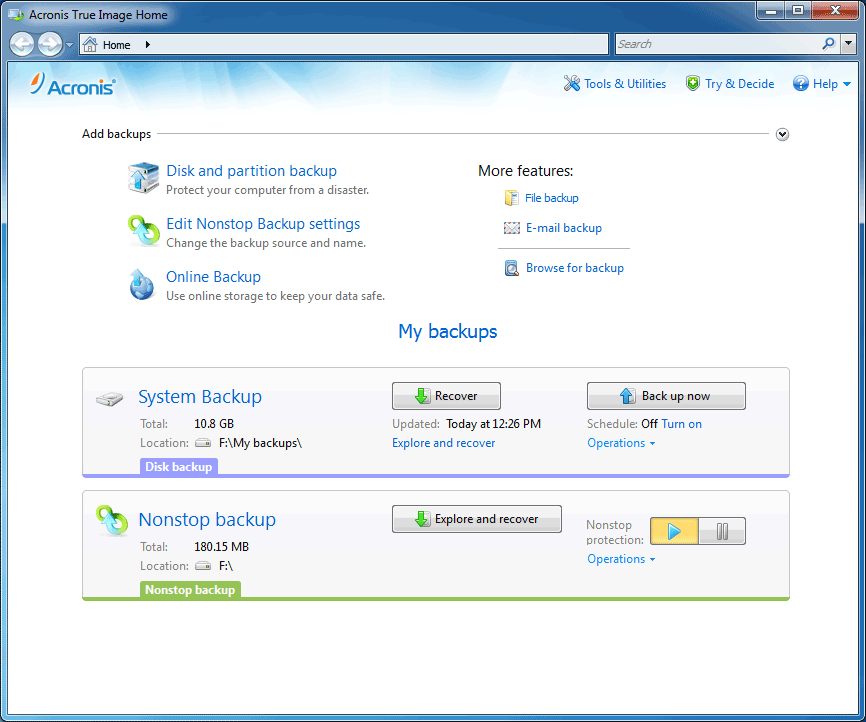 | New GUIA redesign of our friendly user interface includes new features like Drag and Drop, which allows dragging and dropping a backup task to the desktop to create a shortcut. |
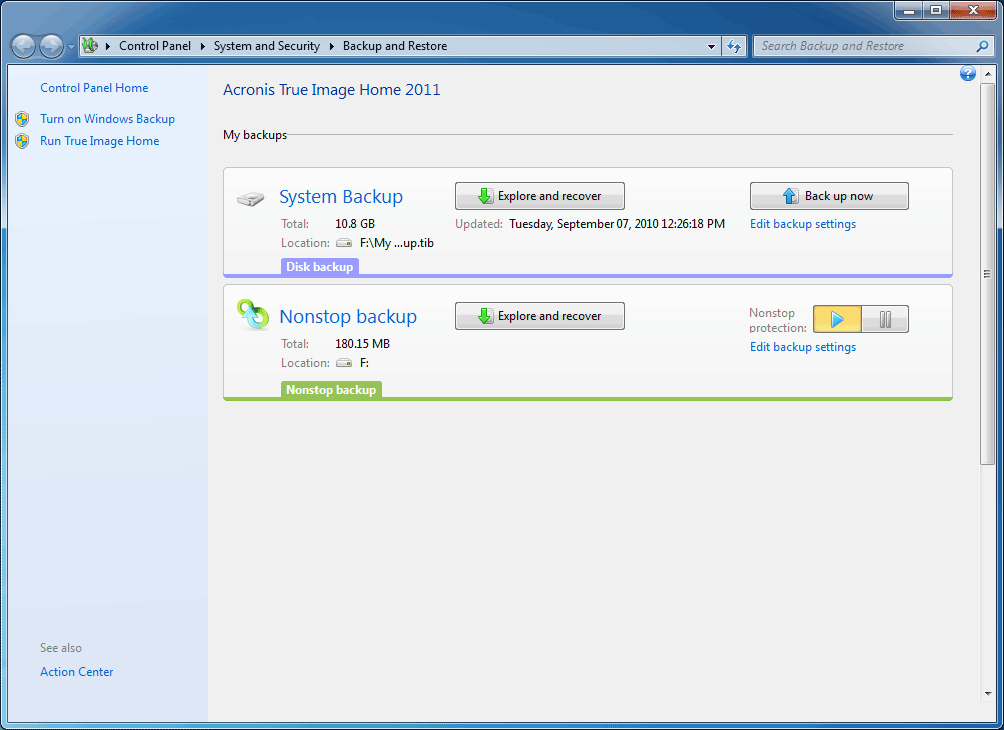 | Windows 7 integrationDiscover how well Acronis® True Image Home 2011 and Windows 7 work together to better protect your PC. |
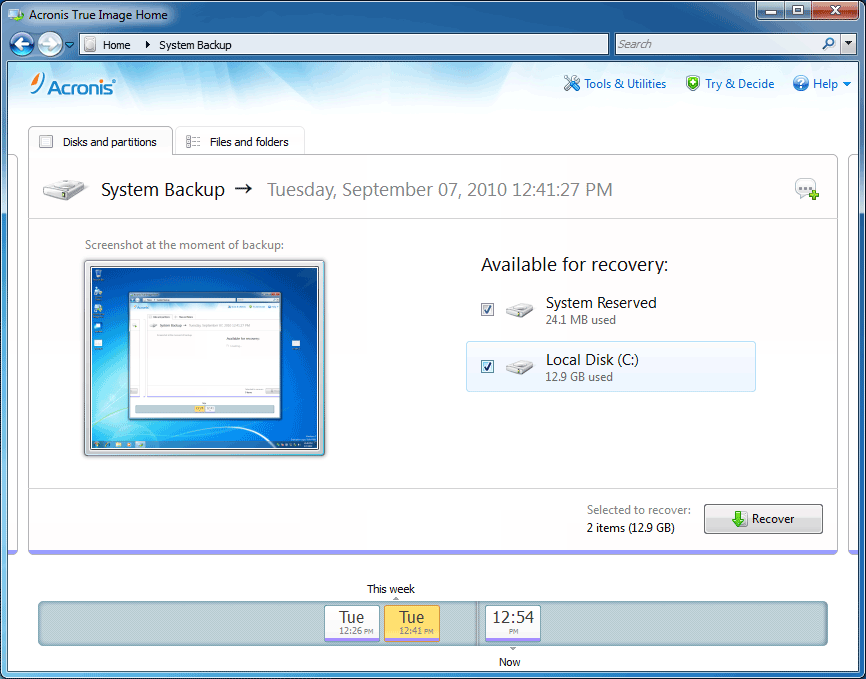 | New Time ExplorerAn easy way to view and manage your backup files from a single screen. |
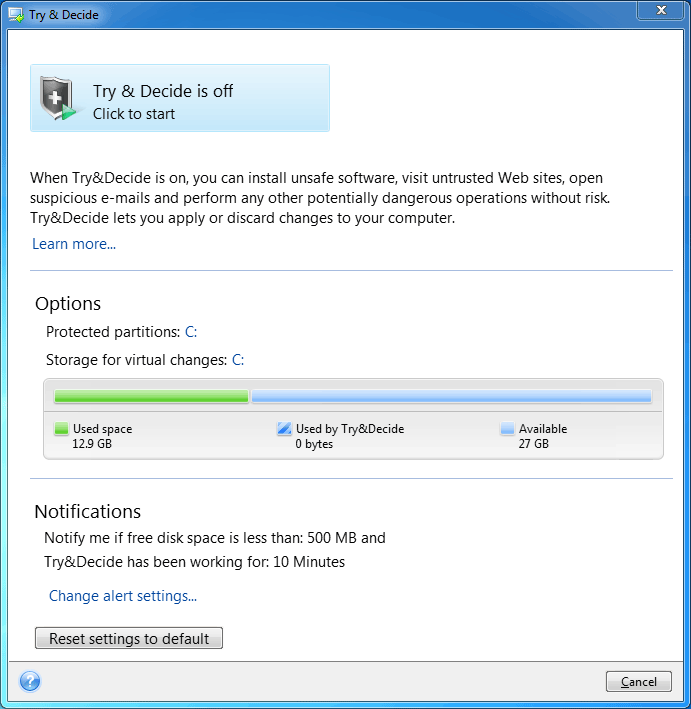 | Try & DecideCreate a confined environment where you can safely try new software and browse the Web. |
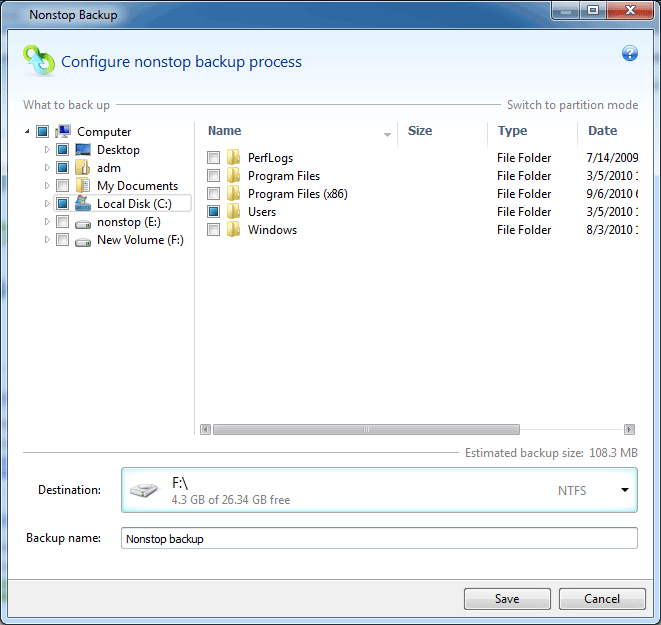 | NonStop BackupAutomatically creates incremental backups allowing you to roll back your system, files and folders to any point in time. |
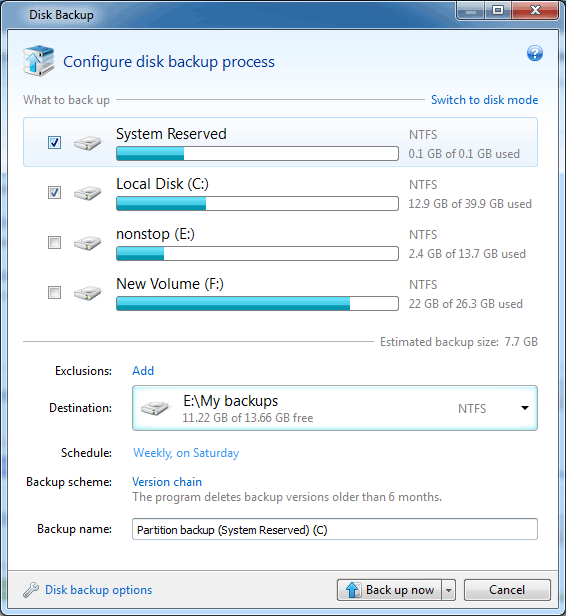 | Disk ImagingBackup the entire system and recover your operating system and applications without reinstalling any software. |
- September 2010 Top 25 Most Popular
- Software of the Year 2010
- Acronis wins PC Advisor's Best PC Utility award
- The new king of midrange backup applications is Acronis Backup & Recovery 10’ according to Storage Magazine and SearchStorage.com’s quality awards for backup and recovery software’
- Acronis True Image Home 2011
- Disk Imaging Software Review
Online Store Benefits
Online shopping is becoming more and more popular day by day. In spite of the fact historically people are more used to buying products in large stores, in the era of computerization shopping online has become extremely simple. Noted below are just several of the numerous benefits of shopping online.
What are the major benefits of online shopping?
- It's convenient!
- Purchases are made from the location which is convenient for you. You may buy from office, from home, it is up to you. You choose not only the location, but also the time. Online shops are open 24/7. There is no shipping, so you save time and can start using our product straight away.
- It's secure!
- A CD can be lost or broken, but buying online keeps you safe. When buying online you receive an activation key which can be restored, if forgotten or lost.
- It's tuned!
- Buying in our online store you are sure to get the latest version (note, unavailable in box versions some time after the release) and have a straight access to the updates of your product.
- It's your choice!
- In online shops there are no salespersons, who can have any influence whatsoever on the product you purchase. It is entirely your choice. And you can make it after consulting Customer stories and testing the software you are interested in.
- It's up-to-date!
- Once registered, you will be the first to receive information on our new products. If you forget your password, we will help you restore it.
- It's flexible!
- If you realize that the chosen product is not exactly right, you can always get your money back during 30 days. Not all offline stores provide a 30-day money back guarantee. But we are sure you will not regret purchasing our products!
- Quick Links:
- Product Updates
- Customer Support
- User Login
- Articles
 Acronis Inc. Backup software.
Choose your region
- Canada English
- Canada Français
- México / Mexico
- United States
- België / Belgium Nederlands
- Belgique / Belgium Français
- Deutschland / Germany
- España / Spain
- Europe English
- France / France
- Italia / Italy
- Nederland / The Netherlands
- Polska / Poland
- Portugal / Portugal
- Россия / Russia
- United Kingdom
- Singapore English
- 中国 / China 简体中文
- 台灣 / Taiwan 繁體中文
- Hong Kong English
- 대한민국 / Korea
- 日本 / Japan
<img height="1" width="1" border="0" src="http://www.googleadservices.com/pagead/conversion/1072375660/?frame=0&random=1301902835364&cv=6&fst=1301902835364&num=1&fmt=1&value=1&label=pageview&hl=en&gl=US&guid=ON&u_h=900&u_w=1600&u_ah=870&u_aw=1600&u_cd=24&u_his=4&u_tz=-420&u_java=false&u_nplug=8&u_nmime=23&ref=http%3A//www.google.co.id/url%3Fsa%3Dt%26source%3Dweb%26cd%3D1%26ved%3D0CB8QFjAA%26url%3Dhttp%253A%252F%252Fwww.acronis.com%252Fhomecomputing%252Fproducts%252Ftrueimage%252F%26rct%3Dj%26q%3Dacronise%2520true%2520image%26ei%3Du6KYTcWzE4a8rAeY6KD1Cw%26usg%3DAFQjCNFj6siRXCKqc7VmulFxjKccj67F9Q%26sig2%3DgIOkl_C1DGXSLlNf&url=http%3A//www.acronis.com/homecomputing/products/trueimage/" />





 Postingan


0 komentar:
Posting Komentar